

As Secure As Possible

IT systems security is a complex and complicated subject - strictly technical. Bringing together the worlds of business and technology, I invite you to a conversation about security for which we will not need an IT dictionary
IT systems secure is a complex and complicated subject - strictly technical. For the purposes of this article, let's make a few assumptions at the outset. I am the manager of a medium-sized online shop selling automotive parts. The company has regular customers and an established, recognisable brand. The team consists of 4 developers developing the application and 1 server administrator. I use cloud services from one of the larger cloud providers, but my team is responsible for the whole thing. I use a dedicated Magento open source eCommerce engine. Orders and customer data are managed from additional ERP(Enterprise Resources Planning) and CRM(Customer Relationship Management) systems. The warehouse uses a built-in WMS(Warehouse Management System) module, which manages stock levels and shipments.
Application
In order for an eCommerce service to make money, as a manager I need an application that implements such functionality. The chosen system - Magento - is described as a stable, all-hands-on-deck and, above all, secure engine. And this is all true. Adobe publishes security patches and new functionality once a quarter. However, updating the system takes time, requires testing and often additional programming work to get the system working as required. Each quarter, along with the released patches, information is also published[1] on Magento threats detected and fixed. This means that potential security vulnerabilities in the system are public. If we have sufficient knowledge, we can exploit them.
But how will anyone know that I have Magento and in which version? After all, I don't publish it anywhere. Well, recognising Magento from the HTML code in the browser is very simple. The page contains characteristic structures that at first glance even scream that it is Magento.
If the shop is operated by a team with less experience, the hidden version of the system, which is available as standard at /magento_version, is often overlooked
So what can I do?
Knowing about the cyclical patch releases[2] i can plan tests and updates with my team. This approach minimises the time it takes to implement security patches and eliminates the element of surprise in terms of resources and budget. Consciously foregoing updates, knowing security vulnerabilities have been identified and fixed, is acceptable in certain situations, but highly not recommended. It is up to me alone to take this risk. Cyclic application updates at first glance do not add much business value to the system. However, failing to do so can result in a compromised system, leaked customer data, the installation of malware and, in the worst case scenario, the complete disablement of the service or even financial penalties (hello RODO). I also have to remember that even after a security update, no one guarantees that nothing will happen for another quarter. What more can I do?
Security monitoring
I update Magento according to the schedule. My team is prepared for future releases. My system is secure.
With the knowledge in the back of my mind that there are no perfectly secure systems, I have to answer the questions:
- How do I know that the security patches applied have had the intended effect?
- How do I check my application for additional security vulnerabilities?
Web Application Security Testing
There is a class of specialised tools that scan the shop automatically and proactively report on detected problems. An example of such a system is Acunetix[3].
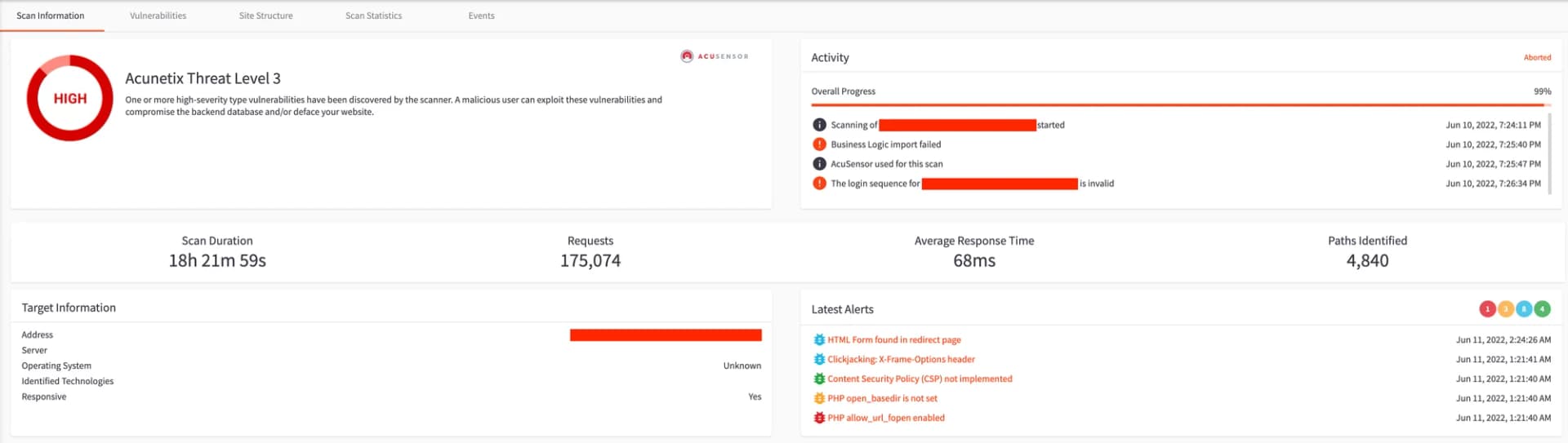
What does this give me?
- Cyclical security scans (e.g. once a week, every time a new version prepared by my team is released)
- Clear reports showing the health of my shop
- Precise guidance to my technical team on how to fix problems quickly.
When choosing a solution for yourself, pay attention to whether the scanner performs proof of exploit. Less refined scanners can show hundreds of items in their reports that are potentially threatening but have not been unproven - a so-called False Positive. This is often unnecessary noise
IDS/IPS
Intrusion Detection Systems, a kind of alarm, as in a car. The main task of this tool is to detect an intrusion attempt and inform the relevant people.
Intrusion Prevention Systems, or, using the same analogy, a dog by the car. These are solutions designed to detect attacks and block them. They are often linked to IDS.
Other interesting capabilities realised by such tools are:
- File Integrity Monitoring - checking whether system files and application files have been modified in an unauthorised way.
- Malware Detection - "antivirus" for web applications.
Web Application Security Testing and IPD/IDS tools complement each other and provide a relatively easy way to monitor threats and potential incidents.
WAF and Firewall
The monitoring systems described earlier do not in any way protect me from threats. Detected problems must be resolved by the relevant technical people. So what can be done to limit attackers and bots' room for manoeuvre? One solution available is web firewalls and their application version: Web Application Firewalls. These are systems that, based on predefined rules, verify traffic to our eCommerce and block it if a condition in the rules is met
For example: I want to block traffic to my shop from all bots other than those collecting data for specific search engines.
What can WAF systems block? For example, certain XSS attacks, SQL Injection, malicious bot traffic.
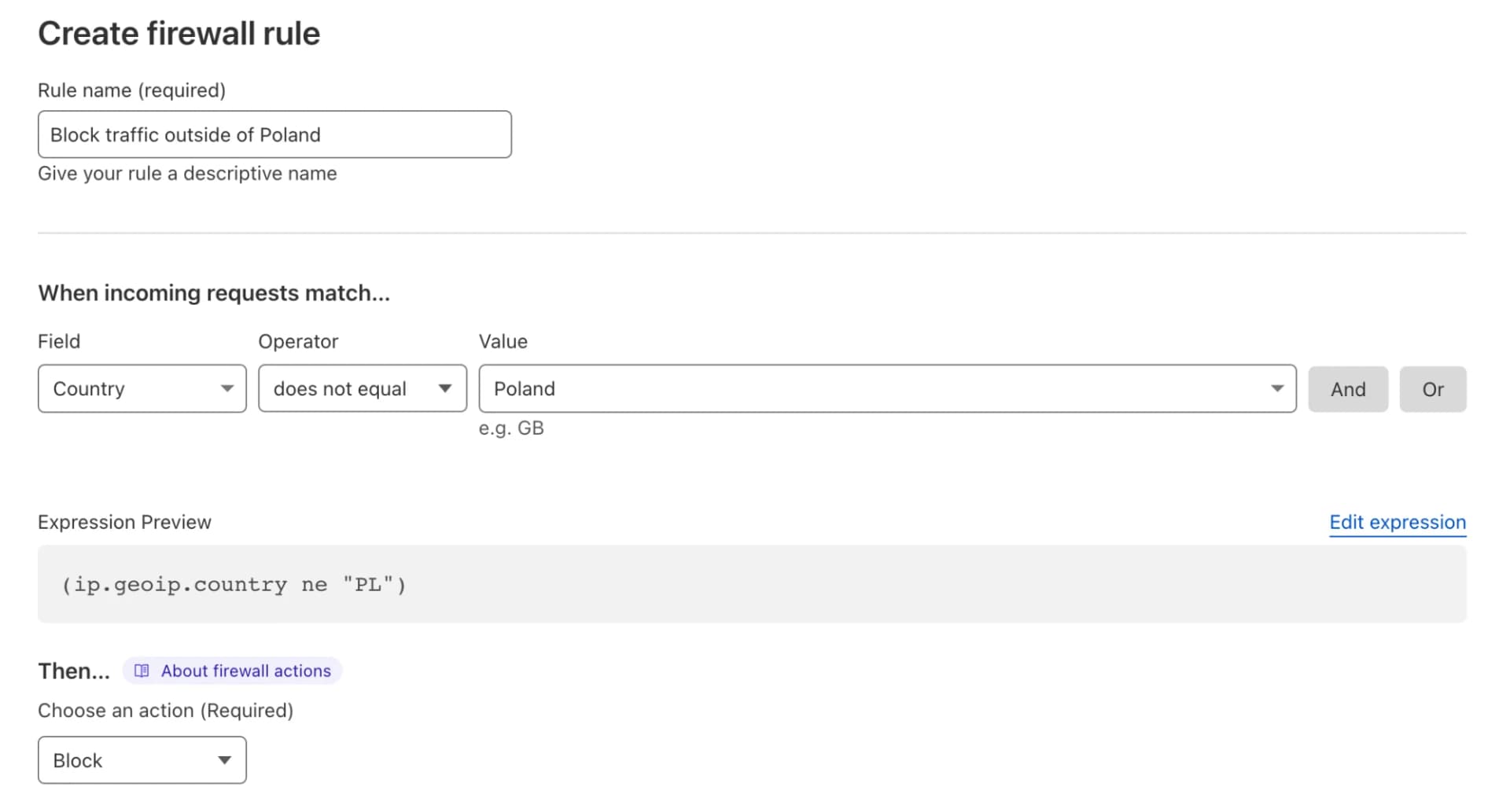
As newer and newer attack methods are created, more sophisticated and harder to detect, more advanced WAF systems have Machine Learning algorithms and frequent updates of predefined rules. We can also restrict traffic to our system based on geolocation - for example, if we sell only to customers in Poland.
The use of WAFs significantly reduces malicious traffic and limits the level of security incidents. However, it is important to remember to use them with your head. After all, we don't want to block the best eCommerce platform for customers and good bots (payment gateways, Google)
Isolation of key services
When owning an eCommerce system, I need to be aware that a certain part of the services that are required for proper operation should not be available to the public. For example, it is worth checking that the administration panel is not at the default address /admin and additionally implement a restriction on the IP addresses that can have access (IP restriction) or even a simple Basic Authentication system (additional login and password).
From a business perspective, this can be a bit of a hindrance. I'm on holiday and want to access reports or on a business trip I want to see how many new orders I have. A good remedy for this is to have a Virtual Private Network (VPN) system, which will allow us to access resources hidden from the outside world from anywhere. Current VPN systems allow installation on almost any device (laptop, phone, tablet) and are easy to use.
Infrastructure
Back to our eCommerce.
The updates are there, the monitoring is there, I have a WAF to protect my shop.
It's time to talk about infrastructure.
On the night of 9-10 March 2021, a data centre belonging to a large European dedicated server provider burned down in Strasbourg. Many services in Poland and other EU countries, and for some sites globally, stopped working; some have not recovered to this day.
What lessons can be learned from this incident?
No dedicated server and hosting operator, regardless of size, will ever give a 100% guarantee of the availability of its services. In theory, they could write that, but life shows that this is impossible. So let's consider a few aspects of what can be done to guard against a long outage of my shop.
High Availability Architecture (hereafter referred to as HA)
This is an infrastructure and application architecture designed in such a way that it's able to function properly, even if system components fail. In most cases, key components are multiplexed in HA mode and are not involved in service provisioning during normal operation. Here we can also mention distributed HA, whose components are distributed in different datacentres (server rooms), different countries or even continents. When building an HA-class architecture, we have to reckon with its significant cost. The aforementioned duplication of services and the high cost of maintenance mean that not all organisations can fully equip themselves with such solutions.
Infrastructure as a Code
Another way to quickly restore a fully functional infrastructure is Infrastructure as Code.
In a nutshell: we do not create the resources from the operator's administration panel. Instead we write the corresponding infrastructure definition. The rest is done automatically. Starting with machines, networks, disks, and ending with domains and advanced configuration.
In short: a job that normally takes several days or even several days to configure, takes several minutes. In addition, it is repeatable and predictable.
Backups
"People are divided into two types - those who already do backups, and those who will do them," says Dr. Kellogg
When approaching the issue of backups, there are a few questions to ask yourself:
What?
- What data is important to me?
- If I have backups, for example of the database itself, will I be able to restore my shop?
The most common practice is to make copies of databases containing customers, orders, products and all other data. In addition, it is a good idea to make copies of application configuration files and media files (graphics, videos, etc.).
Of course, every eCommerce is different. By answering the above questions you can easily identify the areas that need to be backed up/covered by a backup policy.
How often?
- First, how quickly does the data in my shop change?
- How many customers, orders, products arrive per day?
When defining the time between backups, we need to be aware that backups are rarely done on the fly. That is, in the event of a major failure, some data may be irretrievably lost. The systematic nature of backups is determined by the needs and customer behaviour of the eCommerce solution. A local shop can afford to switch on "maintenance" mode (i.e. a temporary shutdown of the shop's full functionality) at night, while a shop operating globally must carry out the same work much more carefully. After all, we cannot shut down shop functionality while a customer is finalising an order. Knowing this risk, it is possible to estimate how the loss of data from a few or several hours of application operation will affect my business. If we arrive at acceptable values - we have the answer to how often.
How?
There is no unambiguously optimal way in which to perform backups. Incremental backups, full backups, dedicated applications, snapshots. It all depends on the complexity of the architecture and the client's specific requirements and budget. If you don't know where to start, start with holistic backups; for example, a full database snapshot and a copy of your shop files.
But remember: better a simple backup than none at all.
Where
The backups need to be stored somewhere other than the original data source. What does this mean?
A good practice is a 3-2-1 strategy
Three copies of the data (data source and two copies). Two independent devices (for example, a disk and an additional disk snapshot). At least one of the copies stored in a different location.
Let's go back to the Strasbourg fire for a moment. Many major sites irretrievably lost data and backups precisely because they were stored in only one datacenter.
The 3-2-1 strategy is not perfect, but things are not perfect. The approach is a good practice recommended by specialists or government institutions of various countries, e.g. US-CERT (United States Computer Emergency Readiness Team), which described the 3-2-1 principle in its publication already in 2012[4]
.
Can it be restored?
Periodic tests to restore backups are just as important as making copies. Why do we need a backup if it cannot be used?
Whether testing is done manually or automatically, it should be done in a non-production environment (e.g. a stage environment). After all, we don't want to damage the source data. It is good practice to carry out restores from a backup in a controlled environment every 3 to 4 months.
Conclusions
We have discussed the basic security issues of IT systems in the context of eCommerce.
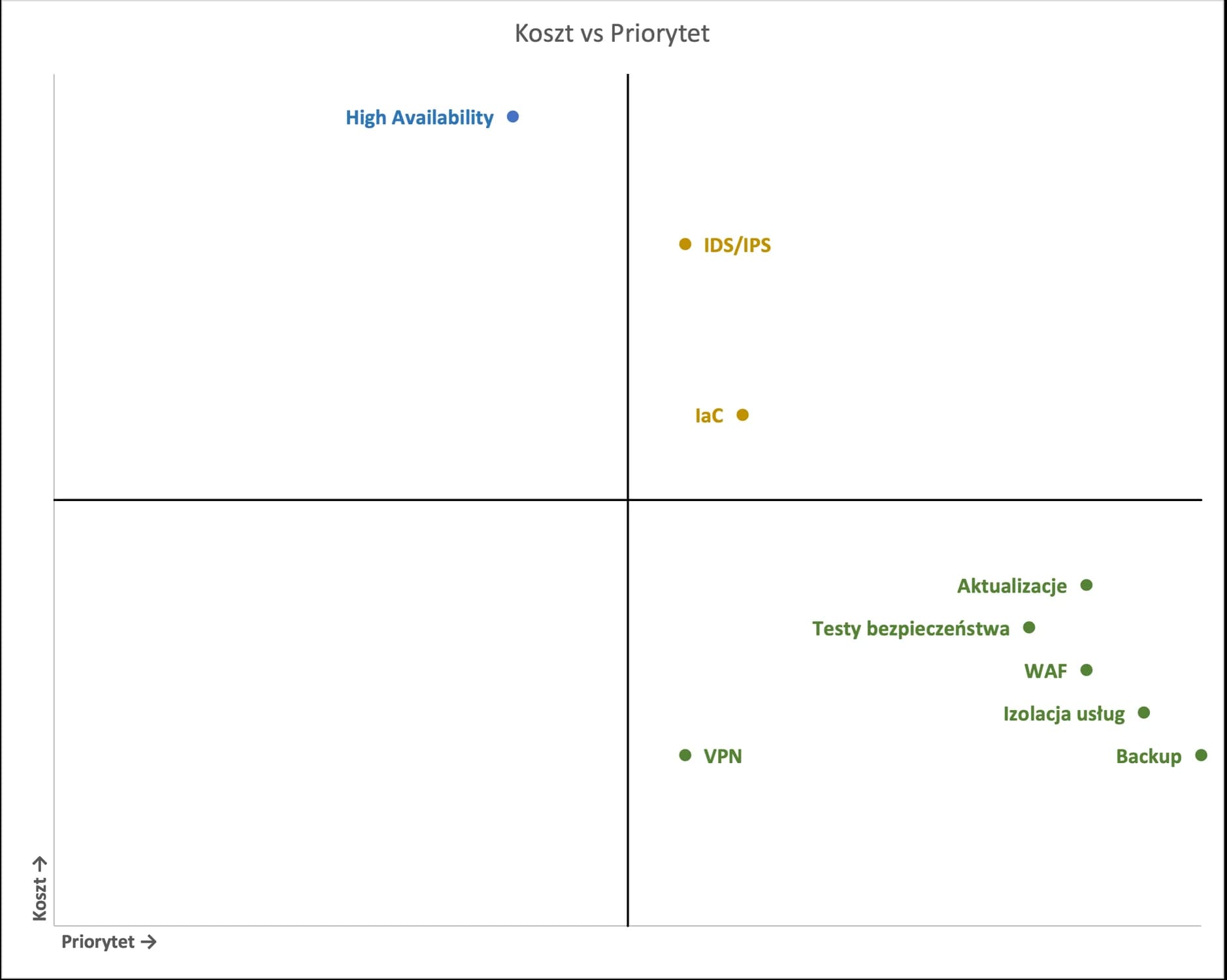
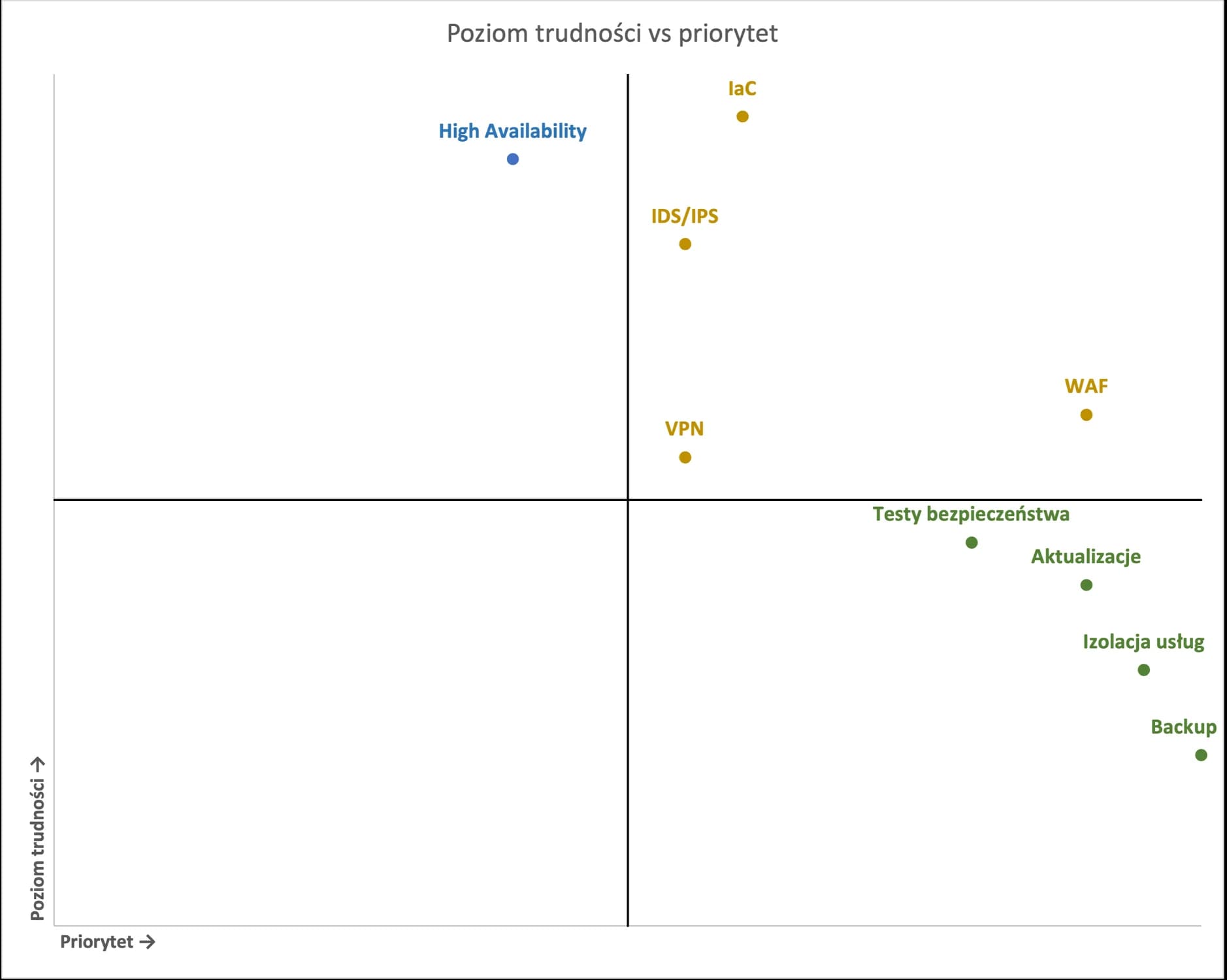
In order to estimate which of the issues presented might be quick for you to implement, assuming a relatively small budget, I have prepared the following summaries:
The above diagrams can be used in most cases to help you plan your budget and the professionals implementing each security feature.
In addition, I suggest you download the prepared document.
This Excel will help you to assess technical risks and determine where on the security scale your business is.
From here, I would like to invite you to the second part of the IT Security topic. We will address the soft areas related to the people in your organisation.
If you are interested in please leave us a message.
[1] https://helpx.adobe.com/security/products/magento/apsb22-12.html
[2] https://devdocs.magento.com/release/
[3] https://www.acunetix.com/
[4] https://www.cisa.gov/uscert/sites/default/files/publications/data_backup_options.pdf